Blog Entries from March 2015
Why Xero?
Posted on March 31, 2015 by Patrick Sheegog
Find out why we added Xero to our service
So we're pushing out Xero live today for beta users, and I thought it would be a good idea to explain why we're adding it to our roster with QuickBooks Online. Our Xero integration has been in the pipe (horrible pun) for a long time and it was totally worth it. Consider this a quick Xero review as a partner developer.
1. People needed a solution
We should make something people want right? Coming from PipeThru, a service that connects anything to everything, we had a good idea of what accounting integrations people were searching for. The numbers said consistently month after month that people were looking for Xero integrations, and most of them wanted to connect to Stripe.
2. Xero is amazing to work with

A large part of why we choose to integrate a product is how committed the company is to partnering with us and how they treat their partners. Xero, similarly to Stripe, believes these partnerships are important. Their staff gave us everything we needed from our initial test account's sign-up, to the final certification process. They even give developers a test account to make sure everything is stable. This means less test prep, and more testing. We have to give a special mention to Sid Maestre, Developer Relations Manager at Xero, who really went above and beyond. He tested the integration from the beginning to make sure it was up to Xero's high standards. He was super patient with us as we built PennyPipe from the ground up. Thanks Sid, you're the best.
3. The Xero API is brilliant to use
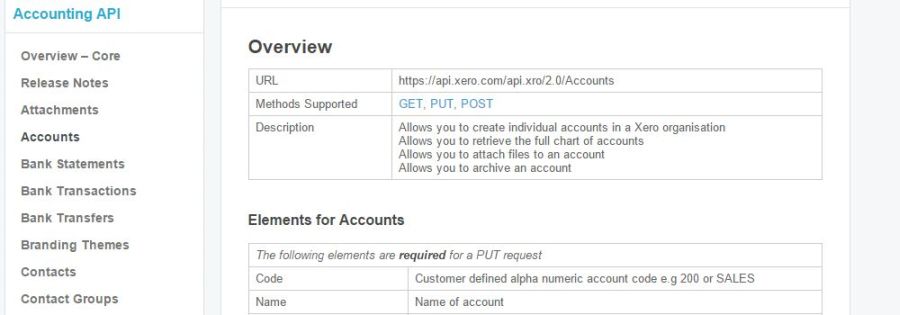
If you can't tell, we love APIs and we can tell a good one from a bad one. Xero is one of the good guys in the API world. Their developer center is well organized, the documentation is on point, and they support what they built. Their security definitely took some time to get right, but we absolutely understand. Take it from us Xero users, your data is safe and then some.
4. Xero's accounting is simple
While QuickBooks Online was our first integration because of pure demand, we certainly had our heart set on Xero from the beginning because of the simple way things are organized. Xero sorts new activities very neatly into bank transactions with the specific categories sorted from that point. Compare that to QuickBooks Online: we're digging through multiple categories of transactions from the get-go. This system is great for developers, as our programmer finds the pure simplicity of bank transactions a breeze to work with.
If you'd like to give our integration with Xero a spin you can sign up and give the beta a try for free. Go on, start reconciling Stripe with Xero. We guarantee it will make your accounting woes less woeful.
Stripe integration with Xero is coming
Posted on March 24, 2015 by Patrick Sheegog
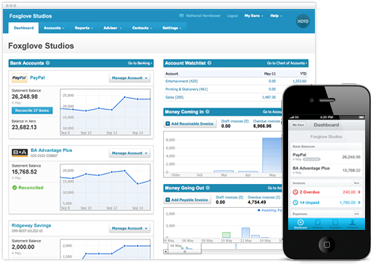
Our lead developer, Andy, has been working pretty hard on our new Stripe integration with Xero and we're almost ready to show it off! This integration will be similar to our QuickBooks Online integration, just Xero style. We love to integrate with Xero's system because we don't have to deal with sales receipts, expenses, just bank transactions. Take a look at what our Stripe integration with Xero can do:
When a charge occurs in Stripe we will
- Create a bank transaction for the full amount of the charge on the account of your choosing
- Create a bank transaction for fees, and deduct the amount of the fee
When a refund occurs in Stripe we will
- Create a bank transaction for the amount refunded
- Create a seperate bank transaction for the expense refunded.
This new Stripe integration with Xero comes standard with our easy to use interface and daily reporting system. We'll have an update soon once Xero is live. Until then, if you have questions feel free to reach out to me directly patrick@pennypipe.com or give a call to 1 888 404 2904
If you'd like to sign up and give us a free try for 7 days click right here.
Dealing with duplicate customer and vendor names in Quickbooks Online
Posted on March 13, 2015 by Patrick Sheegog
As you may have seen in our State of the cloud address, we can be limited by our partner companys' API when we want to do some cool (or even normal) functions. Today our programmer, Andy ,was troubleshooting some delivery failures between Stripe and QuickBooks Online to find one interesting problem with QuickBooks Online. You can't have a vendor and a customer with the same name. A little googling revealed this has been a recurring problem for a while.
Our solution was to add a number (starting with 1) to the base name on repeat names. So now if there is already an "Andy Jones" in your system as a customer or a vendor another "Andy Jones" will be listed as "Andy Jones1". We went ahead and pushed through any failures we had in the past so that now your repeated names will be appropriately labeled.
How does this sound to you? Would you prefer a different way of uniquely identifying that new user? How many repeat names do you find in QuickBooks Online for customers and vendors?
We thrive on your feedback, so feel free to let us know your opinions at support@pennypipe.com or calling us at 888-404-2904.
How to track the transactions we move
Posted on March 9, 2015 by Patrick Sheegog
So, you move a bunch of data with PennyPipe, how do you track down one transaction?
Edit: Note that this older post has screenshots with our previous branding, but is still very relevant and accurate!
The answer is our reporting system combined with one piece of data called the "charge ID". Here's how to find a specific transaction in QuickBooks Online that you're trying to track down.
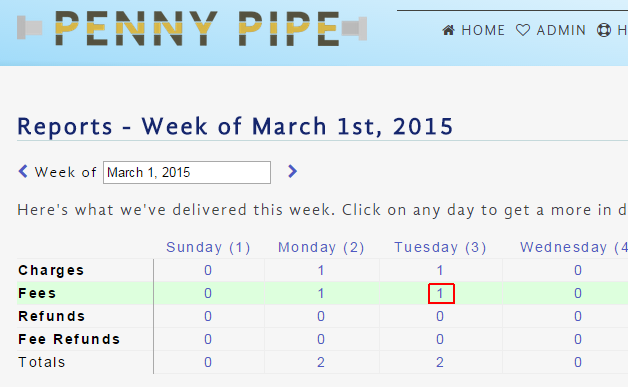
Let's say John Doe made a purchase on 3/3. Our reporting system would show a charge on 3/3 as well as a fee. First click on the "1" representing the charge or fee.
Then, click on the magnifying glass to get the details of that fee:
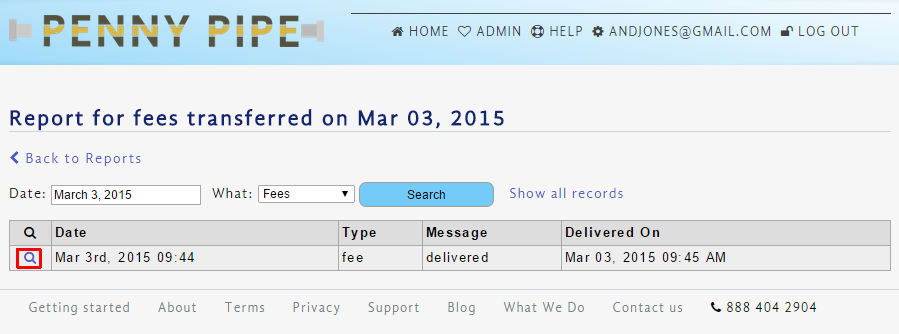
Now you'll then see the details of the fee, including, the charge ID.
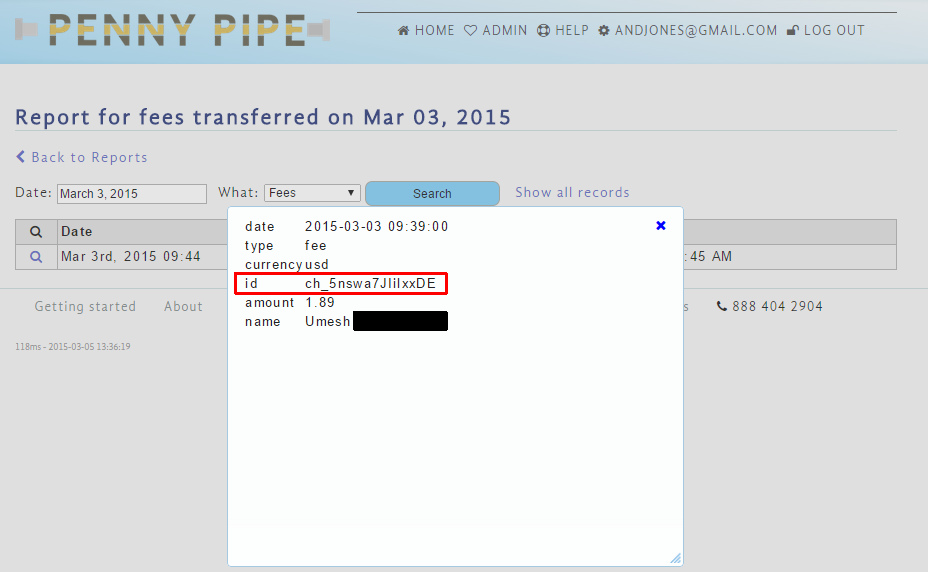
Now, open up QuickBooks Online. You'll find that the charge ID will show up in the description of the fee, charge, or refund in QuickBooks Online when you click on that specific transaction.
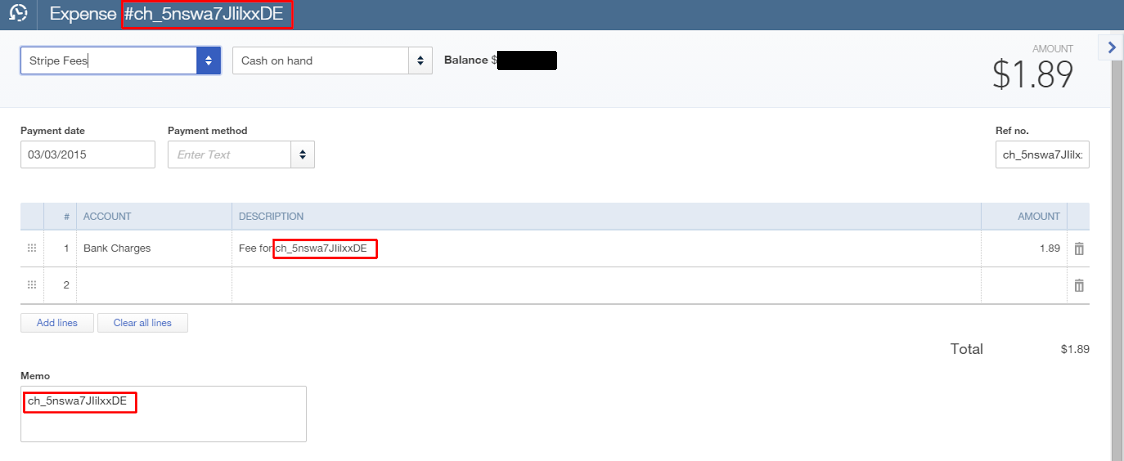
One final note. The charge ID will be the same for a fee and charge so that you can trace them down together. This is the same for refunds with a fee and charge. This should make your search for that needle in a haystack even easier. Is there another PennyPipe feature you'd like us to write about? If you ever need help finding specific transactions, or have questions about how the reporting system works you can contact us directly at support@pennypipe.com or give us a call at 888 404 2904.
Exciting update for refunds
Posted on March 2, 2015 by Patrick Sheegog
We started PennyPipe with the intention of sending every penny of your Stripe transactions to your accounting software, including the very challenging refund data. Over the past couple of weeks made some important updates to refunds based on customer feedback.
Now, when a refund goes through in Stripe we will create a refund receipt in QuickBooks Online and adjust the refunded fees correctly by adding a journal entry for refunded fees.
Let's dig into how we did this. When Stripe refunds things, they kindly refund everything. This includes any fees Stripe charges. This means a charge has a sales receipt and a refund has a refund receipt. We separated the refunded transaction from the refund of that transaction's fees and made it so PennyPipe will make Stripe fees an expense entry and add a journal entry for refunded fees. The journal entries for refunded fees will show up correctly in any reports in QuickBooks Online that show the Stripe fees. Now your Quickbooks accounts should balance to the penny.
We're working on some exciting things coming soon. One new feature is a daily email digest. We'll let you know through the blog in a couple of weeks when that features goes live.
As always, if you have any feedback or would like a tour of PennyPipe feel free to email support@pennypipe.com or give us a call at 888 404 2904